Warehouse orchestration: turning automation into one system
Gasper Gulotta
19. november 2026
Lesetid:
6 minutter
Oftentimes, warehouses are not built in one pass. Conveyors arrive in one budget cycle, a sorter in another, a goods-to-person system when e-commerce volumes jump, and each project solves a real problem. The result sometimes ends up as a collection of technologies that perform well alone and poorly together. For retail and e-commerce operations, where order profiles fluctuate between full pallets, cases and single pieces, that gap matters most at peak, when a small imbalance between areas becomes a backlog. Warehouse orchestration connects those pieces so that software decides what work moves where and when, and it extends the value of equipment already on the floor. This post covers why automation ends up fragmented, what orchestration does on an ordinary day, how to decide what to keep, integrate or replace, and what to ask a vendor before you sign.

Why phased automation ends up working in isolation
Fragmentation shows up often in brownfield environments, where automation is added bit by bit and the equipment supplier is asked to solve one specific problem. In general merchandise and retail distribution, it is common for new channels, promotions and ranges to be layered onto the same building over the years. The automation itself is usually fine, and is probably the right answer to that problem. The trouble sits upstream and downstream. Every automated process relies on certain inputs to produce the expected outputs, and when those inputs cannot be met reliably, the automation appears to fail.When a sorter starves or a pack line floods, the instinct is to look at the equipment. The better first step is to look at the inputs: is work arriving in the right sequence, at the right rate, with the right stock available? In many cases the equipment performs as designed, and the coordination around it is what is missing.
New builds are not immune. A common cause is a customer specifying separate pieces of automation from different vendors, each with its own software, and planning to integrate them in-house, in the hope that they will connect. Often they do not. With no overarching platform, typically a warehouse execution system (WES), the result is what some may call a Frankenstein build, and a supplier cannot promise a rate when the inputs from systems it does not control are unreliable.
Warehouse orchestration on a normal day
Orders enter the warehouse throughout the day, each with their own priority level and SLA. Some need full pallets, some cases and some individual pieces, whether they are bound for stores or for e-commerce customers. Orchestration means software continuously turns that demand into work. It decides what to release, checks the capacity of the automation, moves material through buffers and workstations, and reacts when conditions change. When areas back up, equipment goes down, or priorities shift, individual systems have no context of what is happening across the site.You can think of automation, people, and processes like instruments in the orchestra, they can all play perfectly on their own, but someone still has to be there to conduct.
What orchestration changes, and what it does not
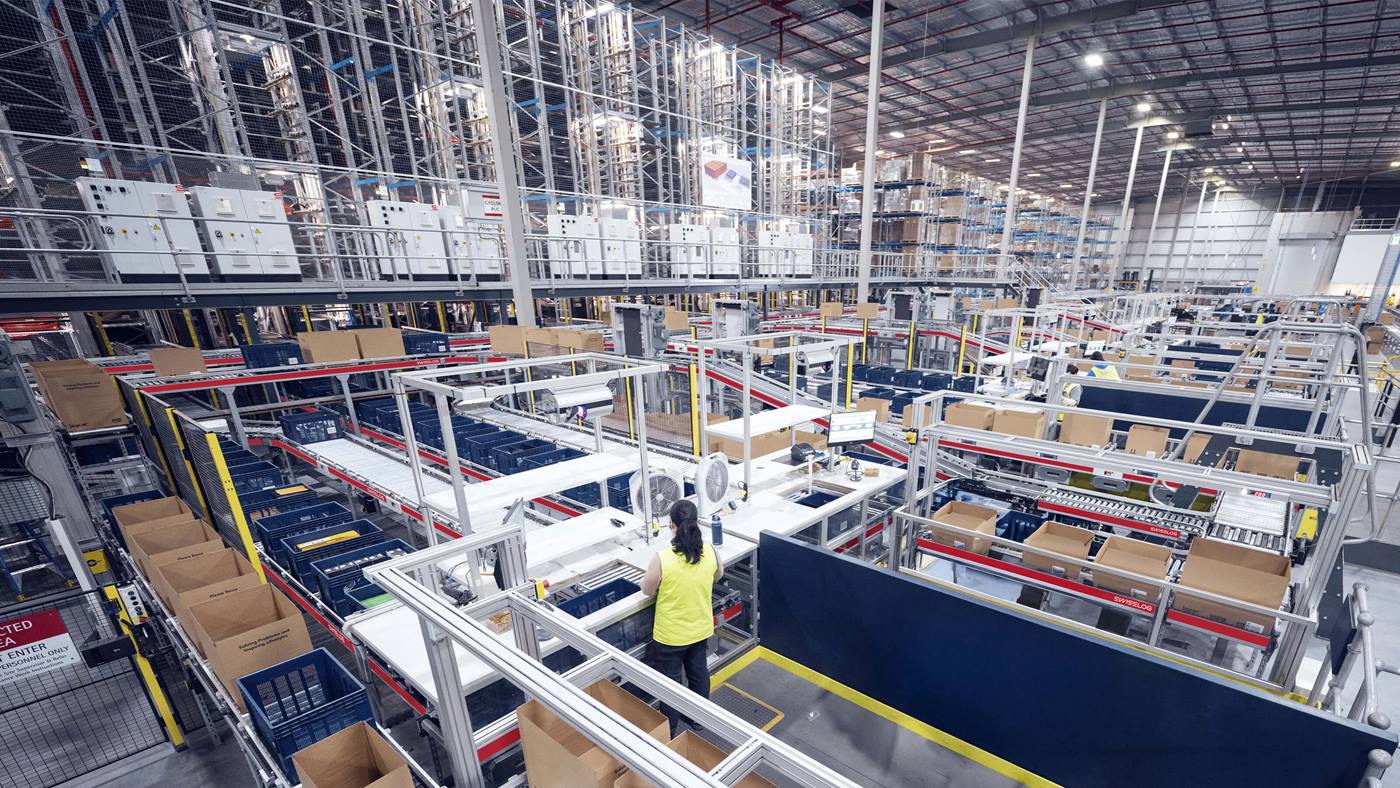
Orchestration does not add physical capacity to a machine. What it changes is how effectively the capacity is used. Consider an e-commerce fulfillment operation with box packing stations fed by a carton erector, bag packing stations using autobaggers, and separate routing for single-piece and multi-piece orders. If orders are released in a poor sequence, the box packing area may flood while operators at the autobaggers wait for work.Many operations manage this by hand, with order wavers reviewing the backlog and releasing a batch of orders. That works until scale makes it impractical. Software must look at the system holistically to reliably balance flow while respecting order priority.
Peak is where this matters most. On an average day, there may be ways to mask poor flow but at peak, equipment runs close to its limit, and the job of the WES is to make sure that limit can actually be reached. An unbalanced operation misses its numbers and its service levels, with a significant financial impact. For retailers that cost is visible: empty store shelves, or e-commerce orders that miss a two-day delivery promise. Customers rarely wait. They take the order elsewhere in the future.
Above the physical systems, whether packing stations, cube storage, a pallet ASRS or robotic picking, a WES coordinates subsystems, a warehouse control system (WCS) communicates with the equipment controllers (PLCs), and a warehouse management system (WMS) manages inventory. Swisslog warehouse automation solutions can be scoped from a basic WCS up to the full WMS, WES and WCS stack depending on the needs and capabilities of the client.
Keep, integrate or replace: how to decide
The decision starts with the business requirement, not the equipment. What throughput does the operation need, where are the bottlenecks, and what has to happen during peak? Against those answers, each existing subsystem can be judged on its own merits.A sorter that is ten years old but running well may not need replacing, provided it is still supported, spare parts are available, it can be interfaced to, and it has the physical capacity for the requirement. Integrating existing automation into a broader execution strategy then adds real value, whether the asset is a sorter, an automated storage and retrieval system or a cube storage system such as AutoStore. Replacement makes most sense when equipment has become a capacity constraint, has reliability issues, or can no longer be supported.
| Situation | What to Check | Typical Decision |
|---|---|---|
| Performs well and can be controlled reliably | Open interfaces, stable behavior under peak load | Keep and integrate into the WES |
| Runs well but acts in isolation | Can it receive instructions and report status? | Integrate, and add orchestration above it |
| Capacity constraint at peak | Is the limit physical, or caused by sequencing? | Orchestrate first; replace if the physical limit remains |
| Reliability issues or no longer supported | Service history, spare parts, long-term support | Replace or upgrade |
Where integration projects go wrong, and what to ask
Integration projects tend to go wrong near the beginning, and not because of a flawed design. The cause is unclear ownership between systems. It is critical to define early which system is responsible for what.Before design is final, settle the ownership questions: who owns order release, who owns inventory, who decides where a pallet goes, who handles an exception, and what happens when inventory does not match between two systems?
Time spent up front on interface definitions, software testing and emulation brings problem edge cases to the surface in a test environment, not during peak.
Does the customer need to replace existing software?
Not necessarily. Asking a customer to replace its software before automation can work is bad for business, and solution providers have every incentive to fit a wide range of environments. A retailer with a sophisticated orchestration platform and the wish to control automation itself may need only a basic WCS with PLC communication. A site that still manages inventory with pen and paper probably needs the full WMS, WES and WCS stack. The ownership swim lanes decide which.What to ask a vendor about equipment you already own
Be wary of a vendor that says it can integrate with anything. Ask specific questions. Has it integrated with this equipment or manufacturer before? Which interfaces are available? What responsibility will it take when something goes wrong at 2am? Who will support the equipment long term, including spare parts, maintenance and support? For a network that spans regions, add one more: which of those commitments apply at each of your sites, and in which time zone and language?Orchestration is rarely a rip-and-replace project. It starts with an honest map of what is on the floor and where flow breaks between systems, then ownership, interfaces and testing decide whether past investments keep paying back. To see how automation fits general merchandise and retail distribution, explore our knowledge pages, or start a conversation with your site layout, peak profile and equipment list.